08.05

The original KinghtRider. And Kitt, the cat.
I don’t know why, but I thought it’d be nice to draw a knight riding his trusty stead.
Here are some of the progressive iterations I made while drawing this.

Progression of Knights on Bikes

The original KinghtRider. And Kitt, the cat.
I don’t know why, but I thought it’d be nice to draw a knight riding his trusty stead.
Here are some of the progressive iterations I made while drawing this.

Progression of Knights on Bikes
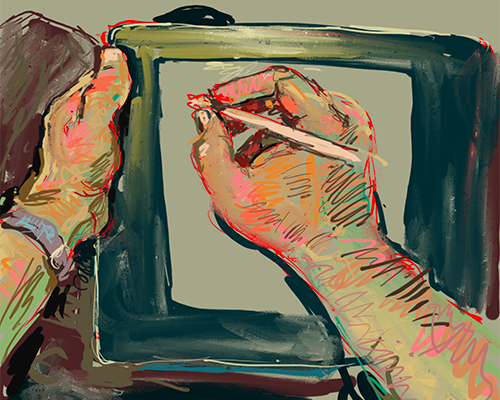
I’ve finally bit the bullet and laid down the cash for a new Wacom Cintiq to replace my ten year old Intuos. It’s terrifyingly expensive, compared, to say, a mouse, for example. I’m really happy with it though, and I’m glad I got it.
Anyway, here is a short review of the Cintiq, and pros and cons as I see them.
Arrival
I spent about a week tracking my Cintiq’s progress across Europe, via the UPS tracking system. It seemed to be heading in the wrong direction at first, but fortunetly it did a screeching 180 degree turn around Nürnberg, and thereafter started heading in a vaguely London-y sort of direction. Phew! Initial disaster averted!

Route of the Cintiq across northwest Europe
When it eventually arrived, the box looked like this, and it smelt nice when I opened it. This box itself came in an even bigger cardboard box, which I intend to turn into a small car for my toddler daughter later; Bonus points to Wacom for that.

The box that the Cintiq came in smells nice
Setting Up
The Wacom Cintiq 12W is essentially a small monitor screen and tablet combined. Hence the first big stumbling block, being a monitor, is that it needs it’s own power supply and also to be plugged into the computer’s graphics card, as well as the USB. Thats a lot of cables and a power supply unit that one needs to mess around with, and as such, it reveals that the Cintiq isn’t as portable as Wacom’s advertising likes to suggest. With current technology being what it is however, I can understand that this is a necessary compromise for something like this. Wacom have dealt with it relatively well by having everything go through special brick-like box. This helps to keep things a bit tidier than they might otherwise be, and it also means that only one cable needs to actually lead into the tablet itself, from the special box.

The Special Wacom Box
The special box also has controls for adjusting the display on the Cintiq.

Cintiq / Macbook setup
There is also a stand underneath the tablet, so you can set it up on your desk at a drawing angle, like a proper drawing board. I’ve found that in practice, so far, I’ve tended not to use this as much as having the wacom on my lap, but its good to know that the option is there.

The Cintiq has a stand!
Drawing
Initially I was slightly worried that I should have saved up twice as much money and went for the bigger Cintiq. The screen is a bit small. Having said that, I quickly got used to it. I also found that, as the Cintiq has a long cable, I was able to sit back in my chair, and draw in a more comfortable position with the Cintiq on my lap. Being able to turn the tablet around and draw on it like I would draw on paper was just brilliant.
One small gotcha to look out for when drawing in bitmap, is due to the small screen size, and if you’re working a very large canvas, lines that look fine when drawn at 25% zoom can turn out to be a bit jaggedy at less than 100% zoom. That can be slightly annoying, but something I can learn to work around.
The buttons on the side of the table are great to work with. There is a zoom slider, a button to drag the canvas around both of which are very useful for drawing with. There is also a button to switch the cursor between different monitors, without having to mess around with different input devices, or split the resolution of the tablet between monitors. I long dreamt of such a button ever since I first started attempting to use my old Intuos tablet in multiple monitor setups. Its great! It means I can easily put reference material up on my laptop screen, and carry on working on my Cintiq screen.

Buttons on my wacom!
The pen is the same as an Intuos, and comes with a handy pen holder. Nothing new there, but all good. Having said that, being able to actually see what you’re drawing with it, in contact with the screen, makes using it much more intuitive and enjoyable than with an Intuos.

Wacom pen
This is the big thing really, with this Cintiq, being able to actually see what you’re drawing. It removes a whole layer a thinking involved when drawing with an Intuos, where you have to be able to draw looking up at the computer screen while your hand draws out of sight. Its not a particularly nice way of working really. In comparison, with the Cintiq, I was quickly able to just get on with the drawing itself, without using up yet more of my increasingly rare spare brain cells on the non-drawing stuff.
Conclusion
I think my new Wacom Cintiq is brilliant. I haven’t felt this exited about drawing stuff for a long long time, and my head has been spinning with lots of new ideas. Although its a massive financial hit in the wallet, I think it will turn out to be worth every penny, and I am confident that it will pay for itself very quickly. Hurray!

My new Wacom Cintiq 12WX is the best thing ever
I got commissioned to design a map for an exhibition about Southall, to be held at the South Bank Centre. I love maps so I jumped at the chance to do this.
I’ve never actually been to Southall myself, despite having lived in London for a decade now. Now I feel I’ve been missing out! Must go there for a curry some time soon…
I’ve made a short viral animation to promote Neil Boorman’s new It’s All Their Fault book.
I did this title sequence for a brilliant new BSL comedy series by William Mager and Charlie Swinbourne. It is called The Fingerspellers. Check it out here.

Fingerspellers Title

Metro City; Home of the Fingerspellers!
I’ve not been getting much time for drawing lately, which is always frustrating. Anyway, just to keep my hand in, I’ve started a drawing of me riding through Richmond Park on my bicycle. Its not finished though.

Sketch of Me Cycling Through Richmond Park
I thought I’d have a go at designing a t-shirt for Threadless.
Well, actually, its an old drawing, but adjusted for t-shirt suitability. Anyway, if you fancy wearing a t-shirt with a dog, bras and knickers on it, please vote me high! I need all the votes I can get. Thanks!

Scruffy the Dog, Mauls Brassiere
And here’s the original sketch!

Original preliminary sketch of Scruffy the Dog, attacking undergarments
I’ve designed the official Christmas card for BSL Corpus Project! Hope they like it.

Santa Claus signing for the BSL Corpus Project video camera, in front of a bluescreen.
I’ve designed a poster for my daughter’s Christmas present! Its a bus. With animals in it!

A London double-decker bus, with lots of zoo animals onboard.
It took me a while to come up with this. Apart from having to fit it in-between my day job, and my dad duties, at first I wasn’t sure what to draw. I had a vague notion of that I should design a poster with animals on it, especially elephants. And poo. I think children love that sort of stuff. Don’t they?

Elephant doing a poo
The elephant alone, however, wasn’t quite cutting it for me. It needed something else. It needed mobility. It needed a bus.

Early draft of a bus
After that, the everything sort of fell into place, as they do when elephants and buses are involved. All I needed to do now was to add the elephant’s fellow passengers on the bus, and the rest, of course, was history.

Progression of design iterations
All I need to do now is find someone who will print it out nice and big onto an A2 canvas. Next on my list of things to draw are Santa Claus, and Hackney County Hall. Watch this space…
Actually I’ve just realised, I think I forgot to add the poo to the final design… argh!